ATS OptimizationResume EngineeringCanva ResumesPDF ParsingCareer Advice
March 8, 2026•6 min read
Why Your Beautiful Canva Resume is Getting Auto-Rejected (An ATS Teardown)
Q
Souvik DeyDocument Architecture & Parser Research
You just spent three hours meticulously aligning text boxes, picking the perfect modern font, and adjusting the margins on a stunning two-column resume template. It looks like a masterpiece. You export the PDF, upload it to a job portal, and wait.
"Unfortunately, we will not be moving forward with your application at this time."
If this loop feels familiar, your experience and qualifications probably aren't the problem. The tool you used to design your resume is.
Most career coaches simply say, "Don't use design tools for resumes; Applicant Tracking Systems (ATS) hate them." But as the engineers building the next generation of parsing tools at Qurtesy, we want to show you the exact computer graphics and coordinate math behind why your beautiful design is getting you silently rejected.
Here is the technical teardown of the two fatal traps waiting inside design-tool resumes.
Fatal Trap 01
The Figma "Flat Image" Trap (Rasterization)
Many tech-savvy professionals design their resumes in tools like Figma. The standard workflow involves creating frames, exporting them as PNG or JPEG images, and then stitching those images together into a single PDF file.
To the human eye, it looks like a standard document. To an ATS parsing engine like Workday, Greenhouse, or Taleo, it looks like a blank page.
Why this fails: Optical Character Recognition (OCR) is not guaranteed
You have effectively submitted a digital photograph of your resume. There is no underlying text stream. For a machine to read it, the employer's HR software must run Optical Character Recognition (OCR) over the image.
The harsh reality? Many ATS platforms bypass OCR entirely to save on server compute costs. If they do run it, OCR is notoriously prone to hallucinating characters (turning an "rn" into an "m", or completely ignoring specialized tech terminology). If the ATS cannot instantly extract a clean text string, your profile is assigned a match score of 0% and routed straight to the rejection pile.
Fatal Trap 02
The Canva "Scattered Matrix" Trap
If you use Canva and select "Download as PDF Standard," you avoid the flat image trap. The resulting PDF does contain actual text vectors.
So why does it still fail? Because graphic design tools are not document editors.
The Coordinate Math Problem:
HTML documents rely on a semantic structure (like a DOM tree) that tells browsers exactly how to read a page from top to bottom. A PDF, however, is a flat 2D Cartesian canvas. The origin (0,0) is at the bottom-left corner of the page. Text is painted onto this canvas using transformation matrices-essentially exact X and Y coordinates.
When you drag and drop text boxes in Canva, the software writes the text into the PDF byte stream chronologically based on when you created or grouped those layers, mapping them to absolute positions.
To reconstruct your reading order, an ATS uses a spatial heuristic called Baseline Clustering. It groups words that share the same horizontal Y-axis, and then reads them from left to right.
ATS Spatial Heuristic (Baseline Clustering)ISO 32000-1 Cartesian Canvas
// Text fragments sharing horizontal baseline are grouped together:
Condition: |y₁ - y₂| ≤ 3.5 points
Action: Group into same line → Sort horizontally (x₁ < x₂)
The Catastrophic Result:
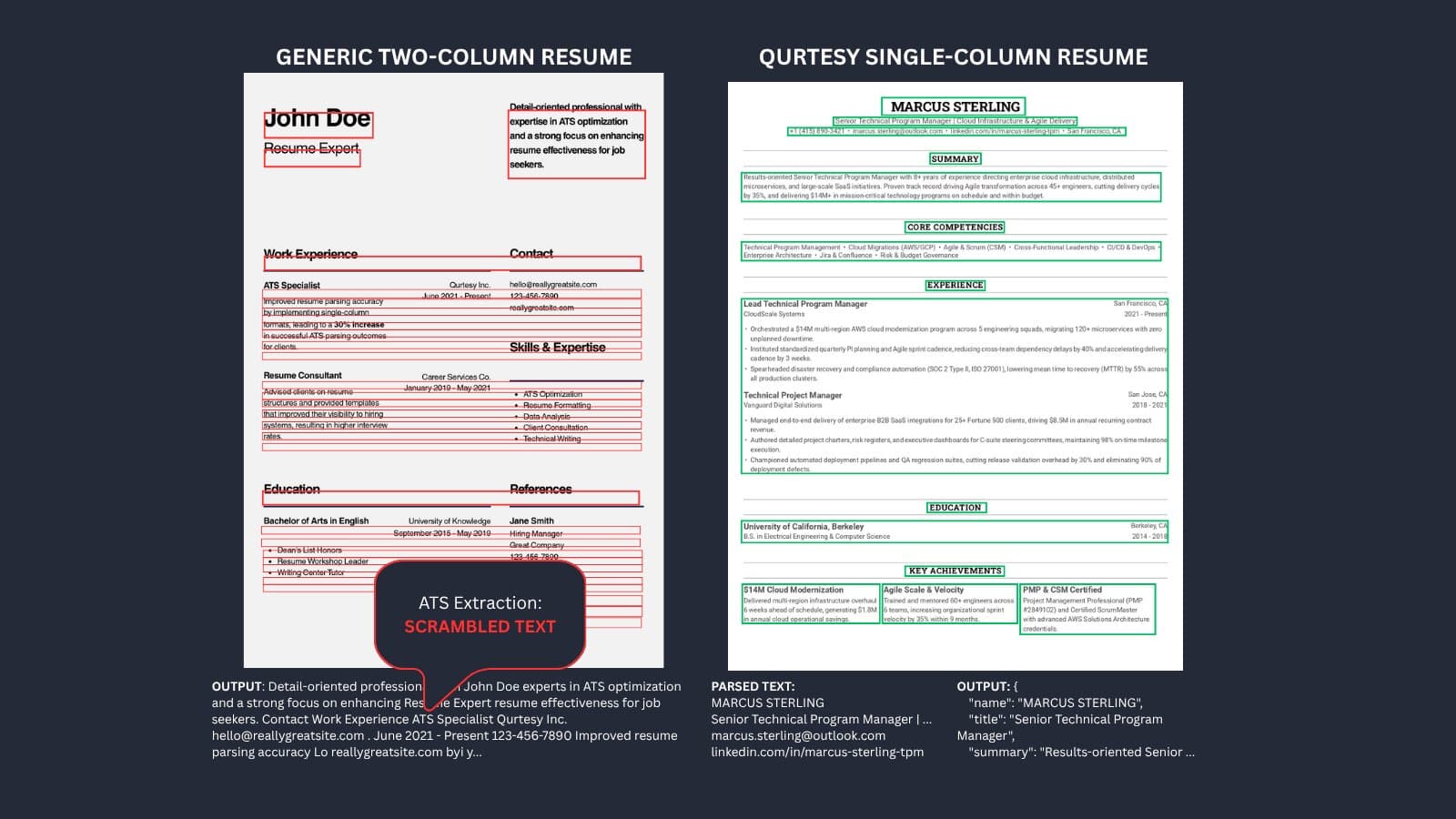
When you use a Canva two-column template, your left column (Job Description) and right column (Skills Sidebar) share the same horizontal baseline.
| Visual Two-Column Layout (What You See) | Linear Byte Stream (What the ATS Reads) |
|---|---|
Left: "Senior Backend Engineer" Right: "Skills: Python, Go, Docker" | "Senior Backend Engineer Skills: Python, Go, Docker" |
Left: "Architected multi-region event pipeline" Right: "2021 – Present" | "Architected multi-region event pipeline 2021 – Present" |
The ATS's Named Entity Recognition (NER) algorithm collapses. It can no longer tell where your job title ends and your skills begin. Your dates get appended to the middle of sentences, and your years-of-experience calculation completely breaks.
The Architecture
The Solution: The Deterministic Document
To beat the ATS, you need a "Deterministic Document"-a resume where the visual reading order perfectly matches the underlying byte stream order.
This means ditching absolute positioning, text boxes, and complex multi-column layouts that rely on visual alignment rather than semantic structure.
A deterministic resume guarantees that:
- Monotonic Y-descent is preserved: Every line of text is mathematically lower on the page than the one before it (
y(k+1) < y(k)). - Visual Order = Stream Order = ATS Parsed Order: Zero baseline ray collisions and zero entity misclassifications.
Stop Guessing. Start Inspecting.
You shouldn't have to guess if the PDF you just downloaded is going to scramble your career history.
We built Qurtesy to solve exactly this problem.
Test your current resume
Upload your Canva or Figma PDF to our Free ATS Resume Parser. It runs 100% locally in your browser (your data never touches a server). You can immediately see the visual reading order and text streams the ATS extracts. If it looks like scrambled gibberish, you have a formatting problem.
Build it right
Switch to the Qurtesy Resume Builder. It uses a structured data engine (JSON to PDF) and single-column, ATS-optimized layouts to guarantee that what you type is exactly what the algorithm reads. No login walls, no data tracking, and no paywalls to export your document.
Your experience is too valuable to be thrown out by a coordinate math error.
Build a resume that both recruiters and robots can actually read.
Q
About Qurtesy
Qurtesy builds free, client-side career micro-tools and ATS-validated resume templates. We engineer deterministic document pipelines so job seekers can apply with confidence, completely free of paywalls, tracking, and server data storage.