Free ATS Resume Parser & Data Extractor
Test how automated Applicant Tracking Systems (ATS) parse your resume and extract clean structured data (JSON, plain text, and contact fields) in seconds. Operates 100% client-side with zero data stored on our servers.
How It Works
- 1Upload your PDF: Drop your resume into the box below. It is processed locally inside your browser.
- 2Inspect parsed fields: Check if your contact info, job titles, dates, and skills are extracted cleanly.
- 3Fix formatting issues: Click to transfer your parsed details directly into our free ATS-friendly editor.
Upload files
Drag & drop or click to browse.
JPG, JPEG, PNG, GIF, MP4, MOV, or WEBM · Up to 1.8GB
PDF Preview
Parsed Results
Awaiting Resume Data
Drop your resume PDF into the upload area above. Extracted contact info, work history, education, and skills will populate here.
The Engineering Behind ATS Parsing: Why Multi-Column Resumes Fail
Most career coaches offer the same generic advice: "Don't use two-column resumes, Applicant Tracking Systems (ATS) can't read them." But rarely does anyone explain why. As engineers, we don't believe in magic-we believe in coordinate math, specifications, and parsing algorithms.
Here is the technical teardown of exactly how ATS extraction works, why dual-column layouts scramble your data, and how our local-first parser processes your PDF.
1. A PDF is Not HTML (The Cartesian Canvas)
Unlike a web page, a PDF does not have a semantic DOM tree. There are no <aside>, <section>, or Flexbox layouts. A PDF is a flat, 2D Cartesian drawing canvas.
Under the ISO 32000-1 specification, the origin (0, 0) sits at the bottom-left corner of the page. Text is painted onto this canvas using an affine transformation matrix. ATS engines don't "read" the page visually; they extract an array of text fragments, each tagged with an exact X and Y coordinate.
2. The "Baseline Clustering" Trap
Because a PDF byte stream can draw text in any random sequence, an ATS (like Workday, Greenhouse, or Lever) has to reconstruct the human reading order using spatial heuristics.
The most common algorithm is Baseline Clustering. The parser groups text fragments into lines using a vertical tolerance threshold:
Action: Group into the same line, then sort horizontally (x₁ < x₂).
3. The Collision: Why Two-Column Layouts Break
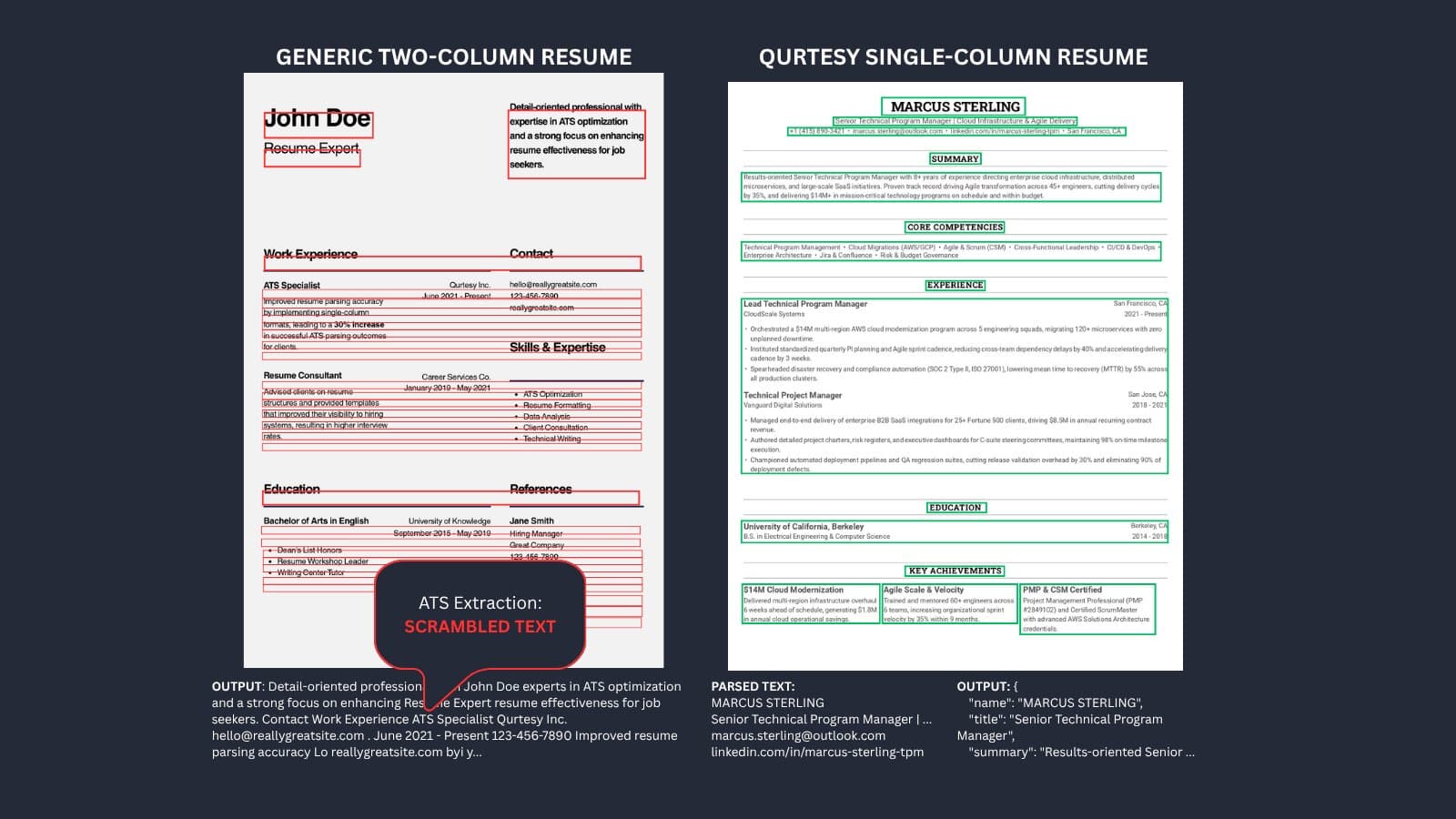
When you use a two-column layout, text in your left column (e.g., your Job Description) and your right column (e.g., your Skills) often share the same horizontal baseline (Y-axis).
When the parser sweeps across the page horizontally, it blindly merges them. For example:
- Left Column: "Senior Distributed Systems Engineer"
- Right Column: "Skills: Python, Go, Kafka"
- What the ATS Extracts: "Senior Distributed Systems Engineer Skills: Python, Go, Kafka"
This phenomenon is called stream interleaving. Once this happens, the ATS Named Entity Recognition (NER) model collapses. Your job title merges with your skills, your dates get appended mid-sentence, and your years-of-experience calculation completely breaks.
4. The Mathematical Guarantee of Single-Column Layouts
In single-column layouts (like the ones generated by the Qurtesy Builder), monotonic Y-descent is strictly preserved: y(k+1) < y(k).
Because there are zero horizontal ray collisions across disparate columns, the visual reading order perfectly matches the document stream order. This turns parsing into a deterministic process, ensuring 100% extraction fidelity when you apply for a job.
5. How Our Client-Side Parser Works
The Qurtesy Free ATS Parser operates differently than cloud-based tools. Leveraging pdfjs-dist directly in your browser, our engine performs geometric gutter detection to attempt to safely linearize multi-column documents locally.Because this happens entirely client-side, your private career data is never uploaded to a server, stored in a database, or used to train AI models.
Why Test Your Resume With an In-Browser Parser?
Over 75% of job applications are filtered by automated screening systems before reaching a recruiter. If an ATS cannot extract your skills or work history, your application may never be seen.
100% In-Browser Privacy
Your contact details, salary histories, and career records never leave your machine. Standard parsing runs client-side in your browser with zero data stored and no AI model training on your personal resume.
Simulate Real ATS Software
Verify how enterprise ATS solutions like Workday, Greenhouse, Taleo, and Lever decode your headings, bullet points, dates, and contact information without layout scramble.
1-Click ATS Fix & Export
If your current resume drops key details or uses broken columns, immediately import your extracted data into Qurtesy's free ATS builder to generate an optimized, single-column resume.
Qurtesy Parser vs. Traditional Online Checkers
See how our client-side, privacy-first parser compares to standard online resume services.
| Feature | Qurtesy In-Browser Parser | Traditional Online Checkers |
|---|---|---|
| Data Privacy | 100% In-Browser (Never stored or logged) | Uploaded to third-party databases |
| Sign-Up Required | No sign-up or email needed | Required account registration & emails |
| Pricing | 100% Free Forever | Freemium with locked paywalls |
| ATS Fix Integration | 1-Click import to ATS Resume Builder | Upsells to paid rewrite services |
Frequently Asked Questions
Everything you need to know about ATS parsing, layout formatting, and resume privacy.
What is an ATS resume parser and why does it matter?
An Applicant Tracking System (ATS) parser is automated software used by employers (such as Workday, Greenhouse, and Lever) to extract raw text and structured fields from resume PDFs. If an ATS cannot parse your contact information, job titles, or experience sections accurately, your resume may be misfiled or discarded before a human recruiter ever reviews it.
Is my resume data or personal information stored on your servers?
No. Qurtesy's parser runs entirely client-side in your web browser. Your resume PDF is decoded and analyzed locally on your device using JavaScript-no personal documents are uploaded, logged, or saved to our databases, and your data is never used to train machine learning models.
Why do some resumes fail or produce scrambled text in ATS software?
Resumes frequently fail ATS parsing due to complex multi-column layouts, tables, embedded graphics, uncommon font encodings, or headers and footers containing critical contact information. Using a clean single-column hierarchy ensures maximum parsing reliability across all major ATS algorithms.
How can I fix formatting issues identified by the parser?
If the parser scrambles your experience or misses your contact details, simplify your resume layout into a clean single-column format with standard headings (e.g., 'Work Experience', 'Education', 'Skills'). You can click 'Edit in our ATS-compliant editor' to instantly transfer your parsed data into our free, ATS-validated templates.
Can this tool parse scanned resumes or image-based PDFs?
Standard applicant tracking systems require text-based PDFs. If you upload a scanned image or document with non-standard font structures, our parser detects this automatically and provides an optional AI-assisted OCR fallback to help recover and structure your text.
How do I extract resume data into JSON or text?
Simply upload your resume PDF. The parser immediately decodes your contact profile, work experience, education, and skills. You can switch to the 'JSON Output' tab to copy the raw structured object or click 'Download JSON' to save the complete resume dataset locally to your computer.
Ready to build an ATS-proof resume?
Create a clean, single-column resume formatted specifically to score 100% on automated Applicant Tracking Systems. Completely free, no subscriptions.
Open Free Resume Builder